> For the complete documentation index, see [llms.txt](https://docs.marpledata.com/docs/llms.txt). Markdown versions of documentation pages are available by appending `.md` to page URLs; this page is available as [Markdown](https://docs.marpledata.com/docs/marple-insight/user-manuals/analysis/mouse-actions.md).
# Mouse Actions
## Mouse Actions
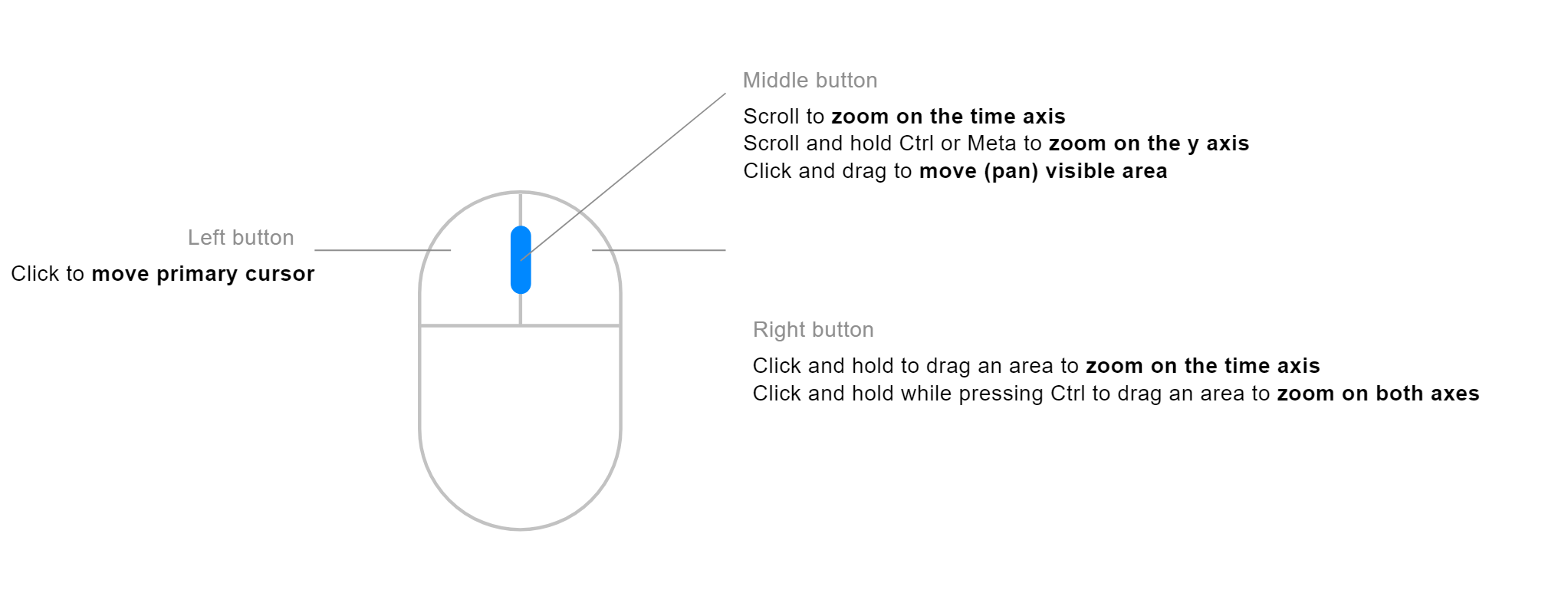
With the mouse, you can do most of the data manipulations needed in the visualisation view.
* **\[Double Click]:** Reset zoom
* **\[Left Click]**: Set/move the cursor
* **\[Right Click + Drag]**: Zoom to selected time range
* **\[Right Click + Drag + CTRL]**: Zoom to selected square
* **\[Middle Button + Scroll]**: Zoom on the time axis
* **\[Swipe vertical]:** Zoom plot range
* **\[Swipe horizontal]:** Pan
* **\[Middle Button + Scroll + CTRL]**: Zoom on the y-axis
* **\[Middle Button + Pan (left/right)]**: Pan from left/right in time axis.
## Touchpad
Marple can be used with the touchpad of a laptop.
In order to zoom in/out in time, you can slide up and down with two fingers on the touchpad. Move left and right to pan in time.
* **\[2 Finger up/down]**: Zoom in time
* **\[2 Finger left right]**: Pan in time (left/right)
* **\[Swipe vertical]:** Zoom plot range
* **\[Swipe horizontal]:** Pan
Marple Touchpad Actions
## **Add and remove Cursors**
* **Mouse Left click**: Add cursor on mouse position
* **Space**: Add 2nd cursor on mouse position
* **Esc**: Remove cursors