> For the complete documentation index, see [llms.txt](https://docs.marpledata.com/docs/llms.txt). Markdown versions of documentation pages are available by appending `.md` to page URLs; this page is available as [Markdown](https://docs.marpledata.com/docs/marple-insight/user-manuals/analysis/plot-types/state.md).
# State
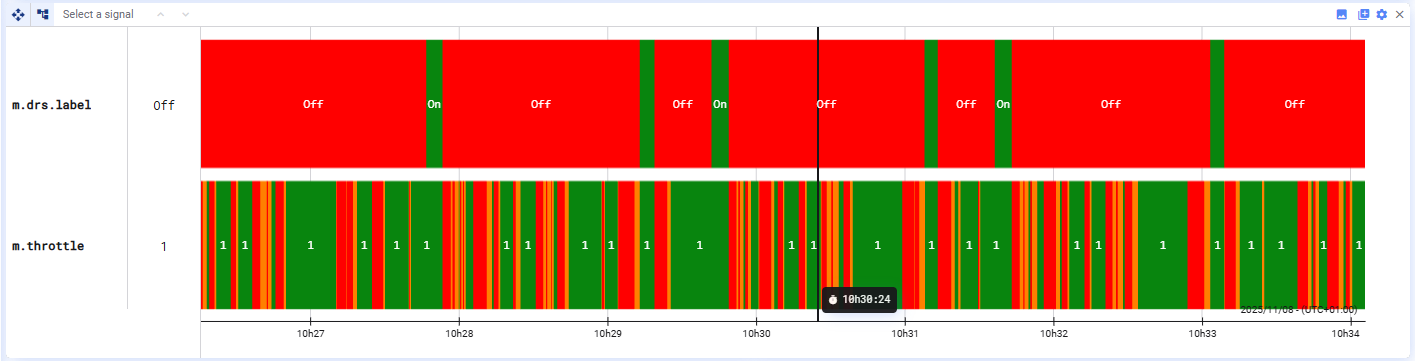
State plots
State plots display the state of one or more signals over time by assigning colors to different value conditions. Each signal appears as a horizontal bar where the color indicates the signal’s state at any moment.
#### Defining State Colors
You can define **color rules** based on conditions, such as:
* *signal value < X*
* *signal value > X*
* *signal value = X*
Each rule assigns a specific color and label when its condition is met.
#### Adding Signals
You can add **as many signals** to a state plot as you need by drag and drop. Each signal will have its own row with its own set of state rules.
#### Plot Settings
In the plot settings, you can:
* Show or hide cursor values
* Show or hide labels
* Select a signal to configure its conditional **color rules**
#### Color rules
Color rules are evaluated **top to bottom**. The plot applies the **first rule that matches** the value for each time range. Use the add all button to insert all states currently visible in the plot.
## Discover the State Plot in 1 minute
{% embed url="" %}
Want to discover more Marple features in 1 minute? Check out other [1 Minute Marple videos](/docs/other-resources/1-minute-marple-videos.md)